
Special Enrollment Period: April 1–30, 2026 | Changes Effective: July 1, 2026
- When do Special Enrollment changes take effect?
-
All changes made between April 1–30 take effect July 1, 2026.
- Who is eligible for the April Special Enrollment?
-
Only employees currently enrolled in an SHBP medical plan as of April 1, 2026. New employees who are still within their “new hire enrollment window” during the month of April can also make a separate election for coverage effective July 1, 2026. Please see the FAQ titled “How Does Special Enrollment Impact New Hires” below for important information!
- Can I keep my current medical plan?
-
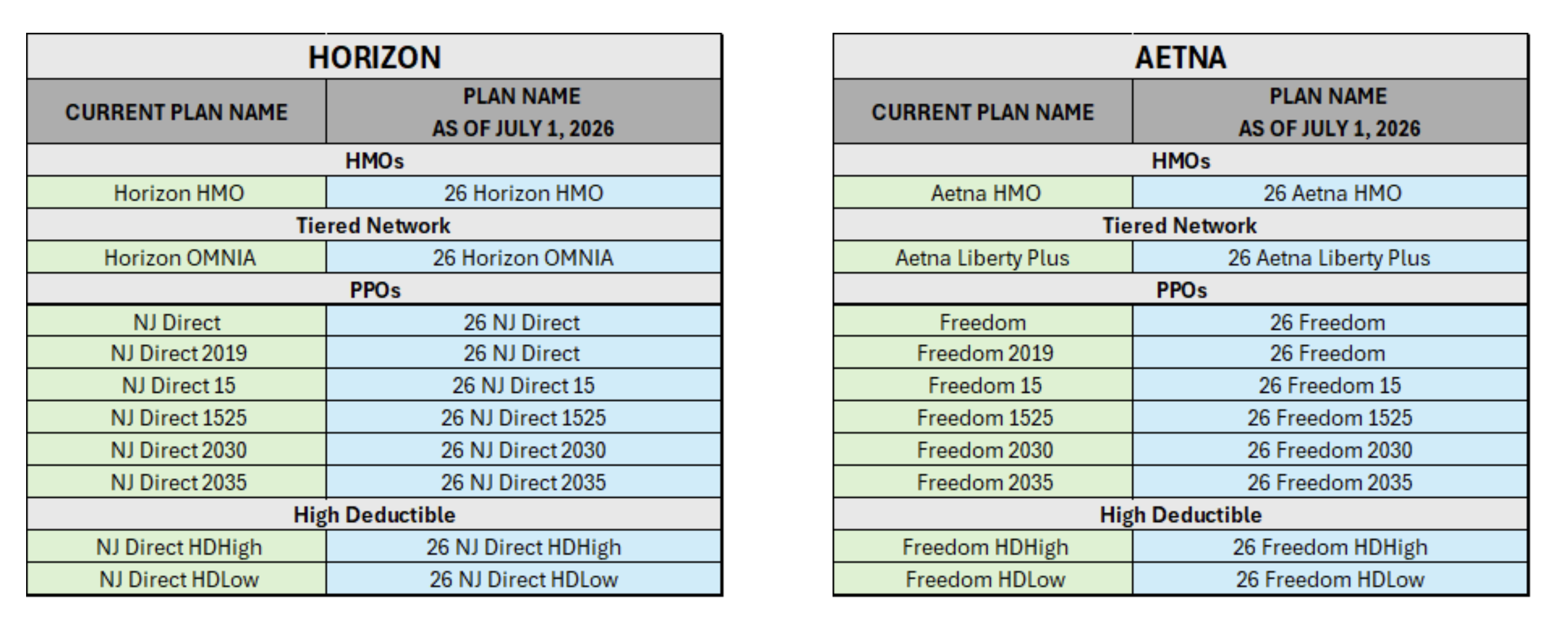
No. All current SHBP medical plans end June 30, 2026.
All enrolled employees will be defaulted into a comparable (not identical) 2026 plan effective July 1, 2026. You should review the plan design, network, and costs to ensure the new plan continues to meet your needs.
- What happens if I take no action?
-
You will be automatically defaulted into your assigned 2026 plan effective July 1, 2026.
No additional changes can be made until October Open Enrollment, with an effective date of January 1, 2027, unless triggered by a qualifying life event.
- Will I get new medical and prescription cards?
-
Yes. New medical and Rx ID cards will be mailed to your home before July 1, 2026.
- Are all plan names changing?
-
Yes. All plan names will change beginning July 1, 2026.
- Can I make changes to my dental plan?
-
No, dental plan changes are not permitted in April.
- Can I make changes to the dependents I cover under my medical plan?
-
No, changes to covered dependents are not permitted during this Special Enrollment period.
These changes must wait until October’s Open Enrollment.
- My child turned 26 in 2026. Will they stay covered through year-end?
-
Yes. Dependent children who turn 26 during the 2026 plan year remain covered through December 31, 2026, and will roll into the default plan with you. No action is required to maintain coverage.
- How can I determine which plan is right for me?
-
Choosing the Right Plan
- Consider the total cost, not just your per paycheck contribution:
- Evaluate premiums, deductibles, copays, and coinsurance by using the SHBP Medical Comparison Charts and SHBP Prescription Plan Comparison Charts
- Use the Horizon and Aetna premium calculators:
- Select “Rutgers/NJIT/University Hospital”.
- Divide the listed annual premium by 24 for per-paycheck costs.
- Think About How Much Care You Expect to Use:
- How often do you (and your family) see your primary care doctor?
- How often do you (and your family) see a specialist?
- Does anyone take regular medications?
- Does anyone have chronic conditions that require frequent testing?
- Any surgery or major care expected?
- Will a higher premium plan protect you from high out‑of‑pocket costs?
- Check Your Doctors and Hospitals:
- Determine if your primary care physicians, specialist and preferred hospitals and pharmacies are considered in network.
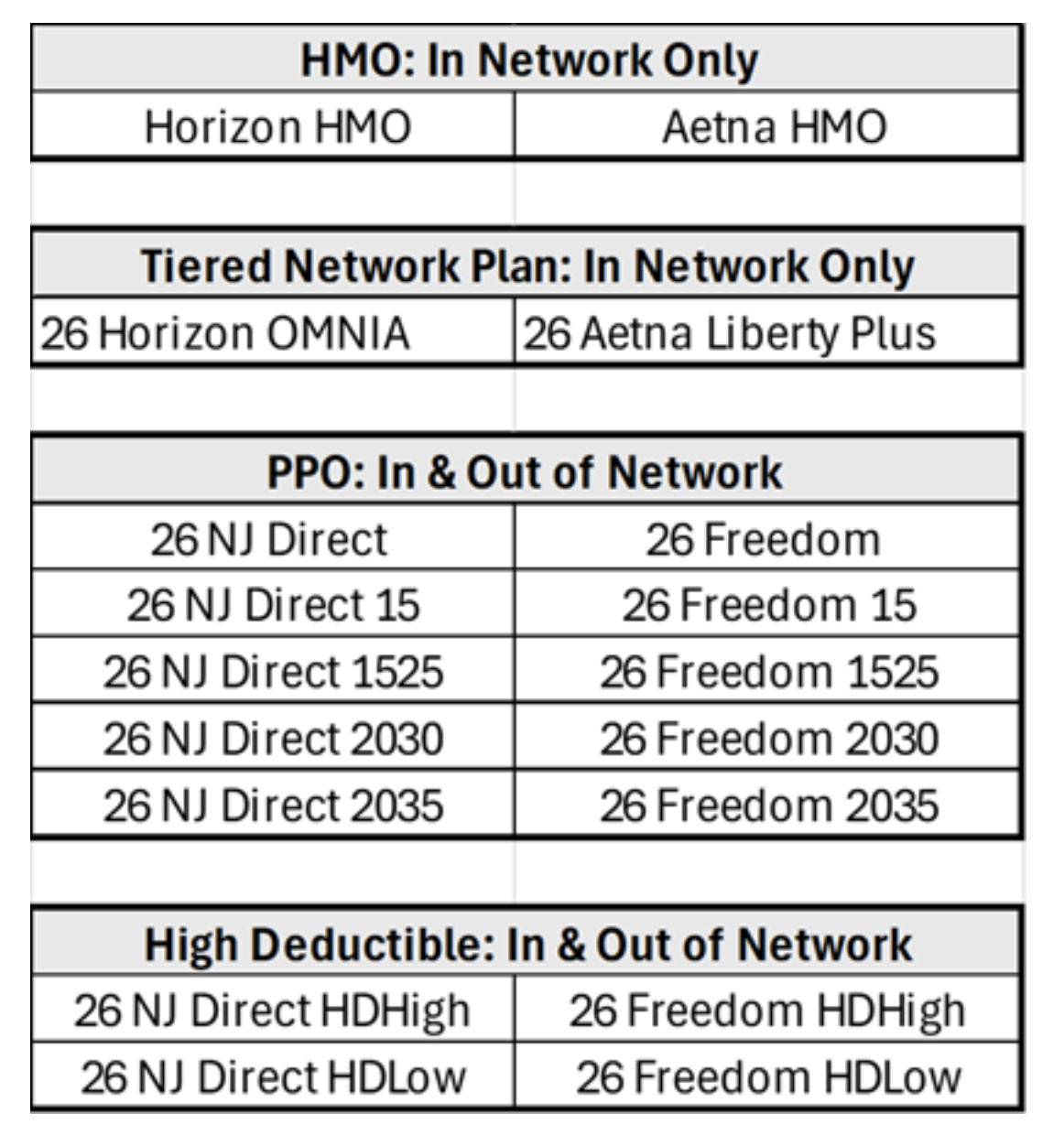
- If any of the above are not in-network, an HMO or a Tiered Network plan will not provide out-of-network coverage.
-
Look at Prescription Coverage Costs:
- Are my medications covered?
- Are they considered
- 1. Generic
- 2. Preferred Brand
- 3. Non-Preferred Brand
- What is the copay for each
There’s no one‑size‑fits‑all plan. Choose the option that aligns with your healthcare needs, your preferred providers, and your comfort level with out‑of‑pocket costs—not simply the lowest premium.
- Consider the total cost, not just your per paycheck contribution:
- Will my 2026 year-to-date deductible or OOP amounts carry over?
-
Yes. NJDPB confirmed:
- Copays already accumulated toward your OOP maximum will carry over.
- Amounts paid toward your deductible will also be carried over.
- This applies whether you remain in the default plan or select a different one.
- How will I be notified about Special Enrollment?
-
You will receive:
- A postcard from SHBP mailed by April 1
- A Benefit Solver email announcing Special Enrollment
- Additional reminders from Benefit Solver:
- On Day 1
- At 10 days remaining
- At 5 days remaining
- On the final day (April 30)
- How does Special Enrollment impact new hires?
-
As an employee in their new hire enrollment window, you MUST make your new hire election (with its effective date prior to 7/1) before you can make an election for 7/1.
If you elect to ‘WAIVE” coverage under your new hire enrollment event, you will not be permitted to make an election effective July 1st, as electability for the July 1 plans is available to those with current enrollments only.
If you make only a new hire election and do not make a separate election under the Special Enrollment window, the plan you choose will default into its comparable (but not identical) new ‘26’ plan effective 7/1/26. Any covered dependents will also be carried forward.
- Why will new hires see two different sets of plans?
-
Because New Hire enrollment uses current (pre 7/1) plans, while Special Enrollment uses new 2026 plans effective July 1.
- What happens to my OMNIA/Liberty incentive if I switch out of the plan?
-
If you leave a tiered incentive plan (OMNIA or Liberty) effective July 1, 2026 without completing a full 12 months of participation:
- You must repay the full $1,000 incentive.
- When does the 12 month incentive clock start for new members?
-
The 12 month requirement begins July 1, 2026 for all newly enrolled tiered plan members.
- What happens to my FSA if I switch to an HDHP?
-
- Your medical FSA terminates June 30, 2026
- Claims must have dates of service between January 1–June 30, 2026
- You may enroll in an HSA effective July 1, 2026
- What happens to my HSA if I switch from an HDHP to a non-HDHP?
-
- HSA contributions end June 30, 2026
- You may continue using your existing HSA funds
- Please keep in mind, you will not be able to enroll in an FSA plan during this Special Enrollment Period.
- How do I review my current benefits or make changes?
-
Log into mynjbenefitshub.nj.gov through your myNewJersey account. Virtual Benefits Fairs and plan summaries are also available in this portal.
- Why can’t I view current and July 2026 premiums side by side in the Horizon calculator?
-
The system uses two different calculators because pre 7/1 rates and post 7/1 rates cannot be displayed together.